Know Which Strategies To Trust Before They Touch Your Money
- Comes with the Ultimate Breakout System at no extra cost
- Every strategy gets five stress tests and a clear PASS, CAUTION or FAIL
- Turns your best strategies into one balanced portfolio, ready for MT5
The UBS Optimizer is an app that runs on your own PC, next to MetaTrader 5. It takes the Ultimate Breakout System from one optimization run to a tested, diversified portfolio, step by step.
One payment of $1,699. The Optimizer is included. · See how it works
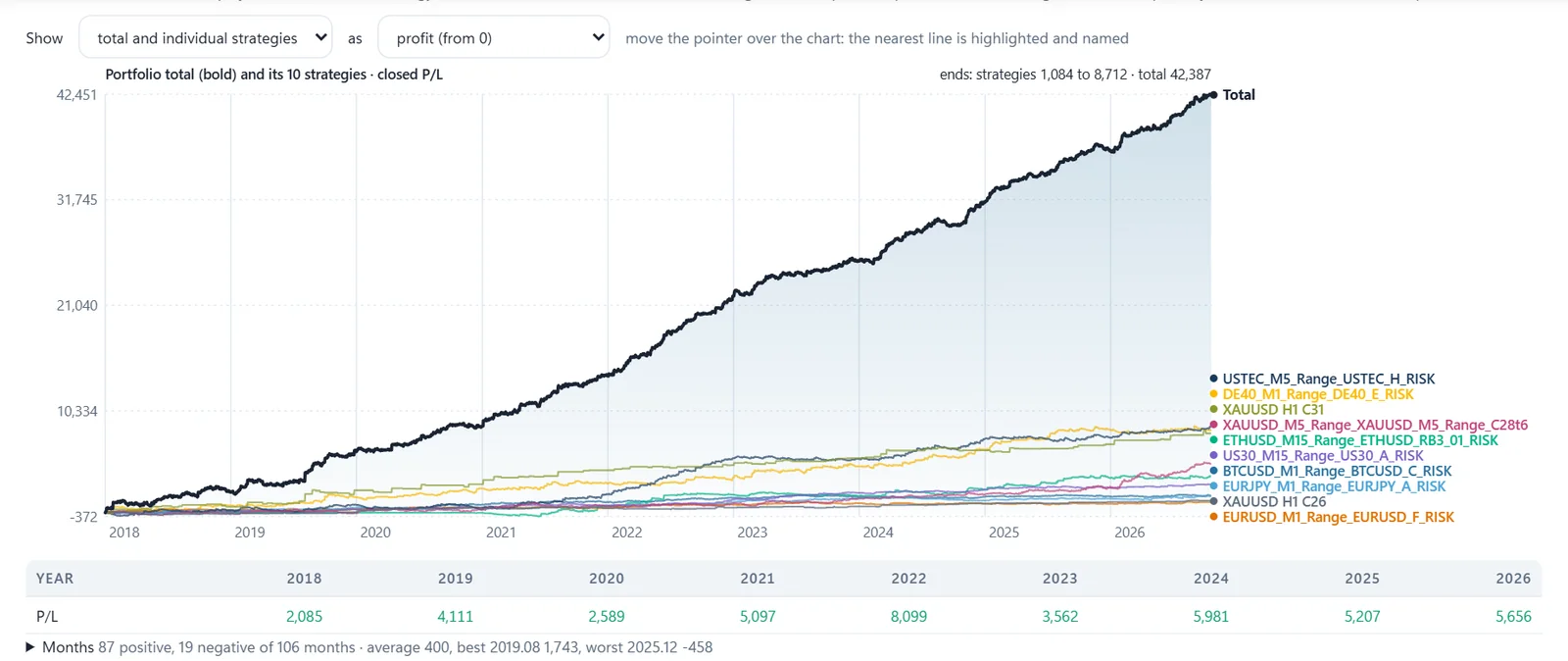
Backtest of an example strategy or portfolio. Past results are no guarantee of future results.
350+
Ready-made strategies
5
Stress tests per strategy
1 click
To a balanced portfolio
Any
Broker, symbols matched
Why It Exists
A Great Optimization Result Is Not A Track Record
Run an optimizer long enough and something will look perfect. That is the trap. A setting can fit the past so well that it tells you nothing about the future, and you only find out with real money on the line.
The UBS Optimizer keeps back the years the optimizer never saw, tests every candidate on them, and tells you plainly which ones held up and why. You stop guessing which set file to trust.
How It Works
From One Optimization To A Portfolio, In Six Steps
- Step 1: CreateSet up a full MT5 optimization on one screen.
- Step 2: SelectThousands of passes filtered down to the few worth testing.
- Step 3: Stress TestFive tests per strategy and a verdict in plain words.
- Step 4: FinetunePolish a strategy without fitting it to the past.
- Step 5: PortfolioThe least correlated mix, sized to your drawdown target.
- Step 6: Live CheckSee if your live account trades like the backtest.
Step 1 · Create
Build Your Own Strategies, Not Someone Else's
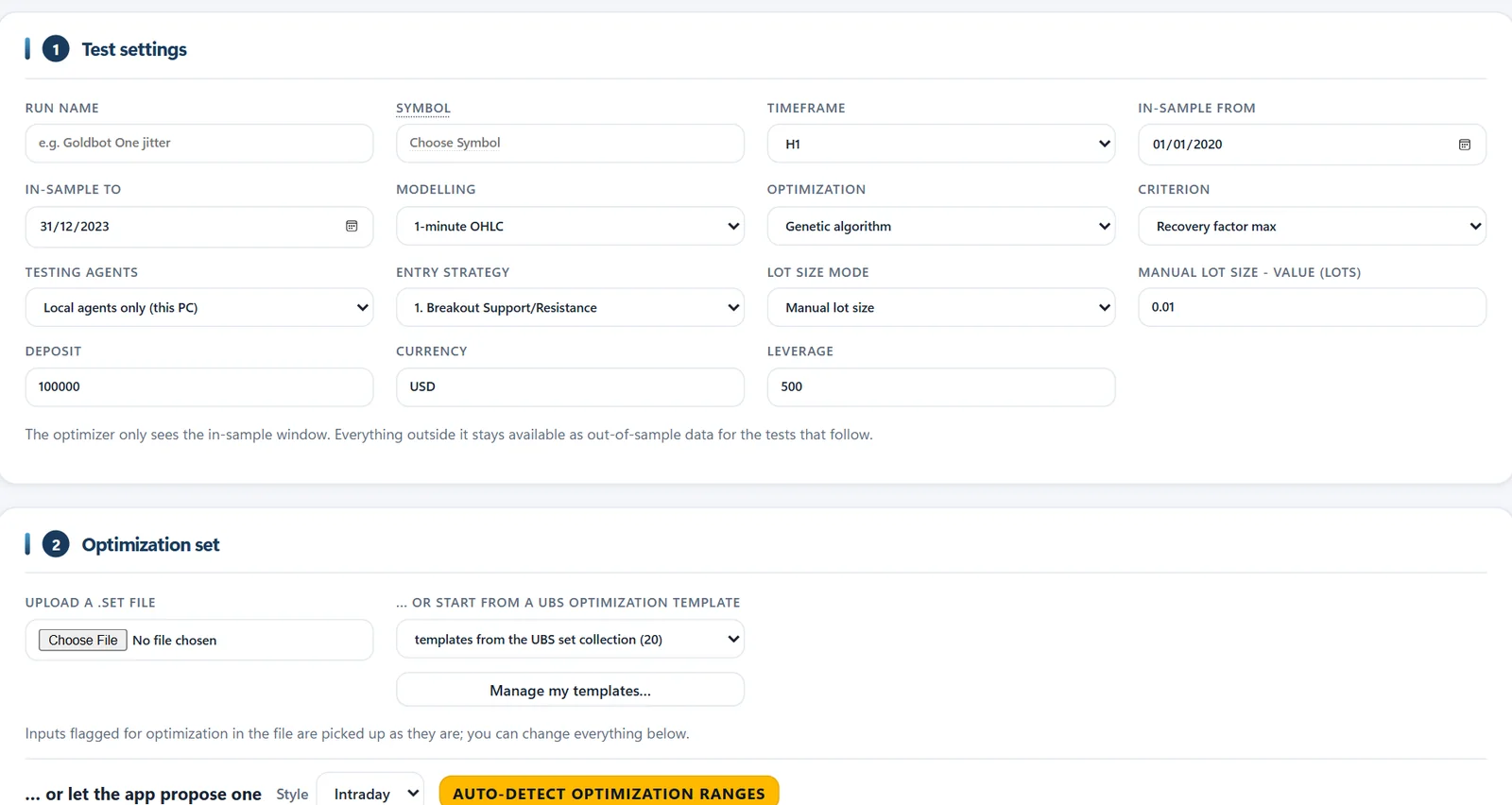
Set up a full MetaTrader 5 optimization of the Ultimate Breakout System on one screen. The app runs MT5 for you, collects every pass and keeps back the years it never saw, for the tests that come later.
Only the years you choose
You pick the optimization window. Everything outside it is kept apart as true out-of-sample data.
Every setting in one form
Three entry strategies (Support/Resistance, Volatility and Range Breakout), every lot mode, genetic or full optimization, on local agents or the MQL5 Cloud.
Ranges suggested for you
Auto-detect measures the symbol's volatility and suggests sensible ranges. Or start from your own set file or a UBS template.
Step 2 · Select
Thousands Of Passes In, The Best Few Out
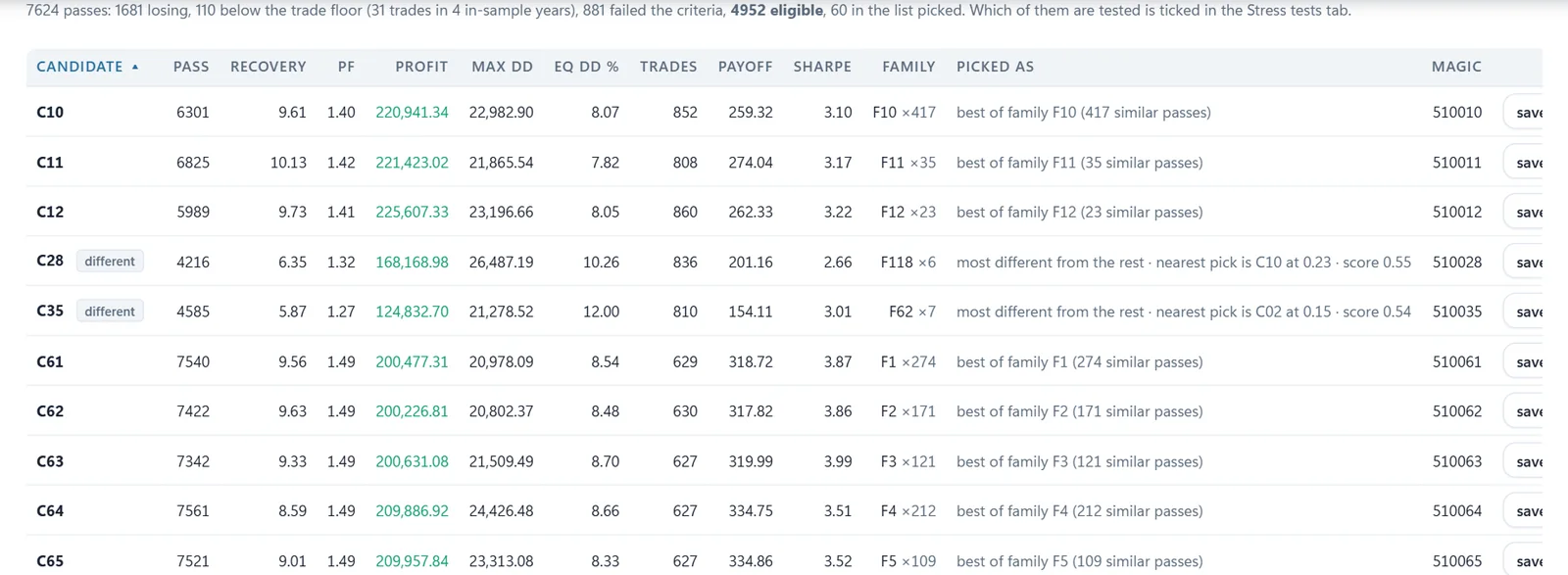
No more scrolling through endless optimization results. The app filters, groups and picks the candidates worth testing, on its own.
Filtered on your rules
Losing passes, passes with too few trades and passes that break your rules are dropped. In this example 7,624 passes came in, 4,952 were eligible and 60 were picked.
Grouped into families
Passes with nearly the same settings form one family, and only the best of each goes through. You do not test the same idea twenty times.
Different on purpose
The candidates least like the rest are added too. That is the raw material for a portfolio that does not move as one.
Step 3 · Stress Test
Every Strategy Gets A Verdict: PASS, CAUTION Or FAIL
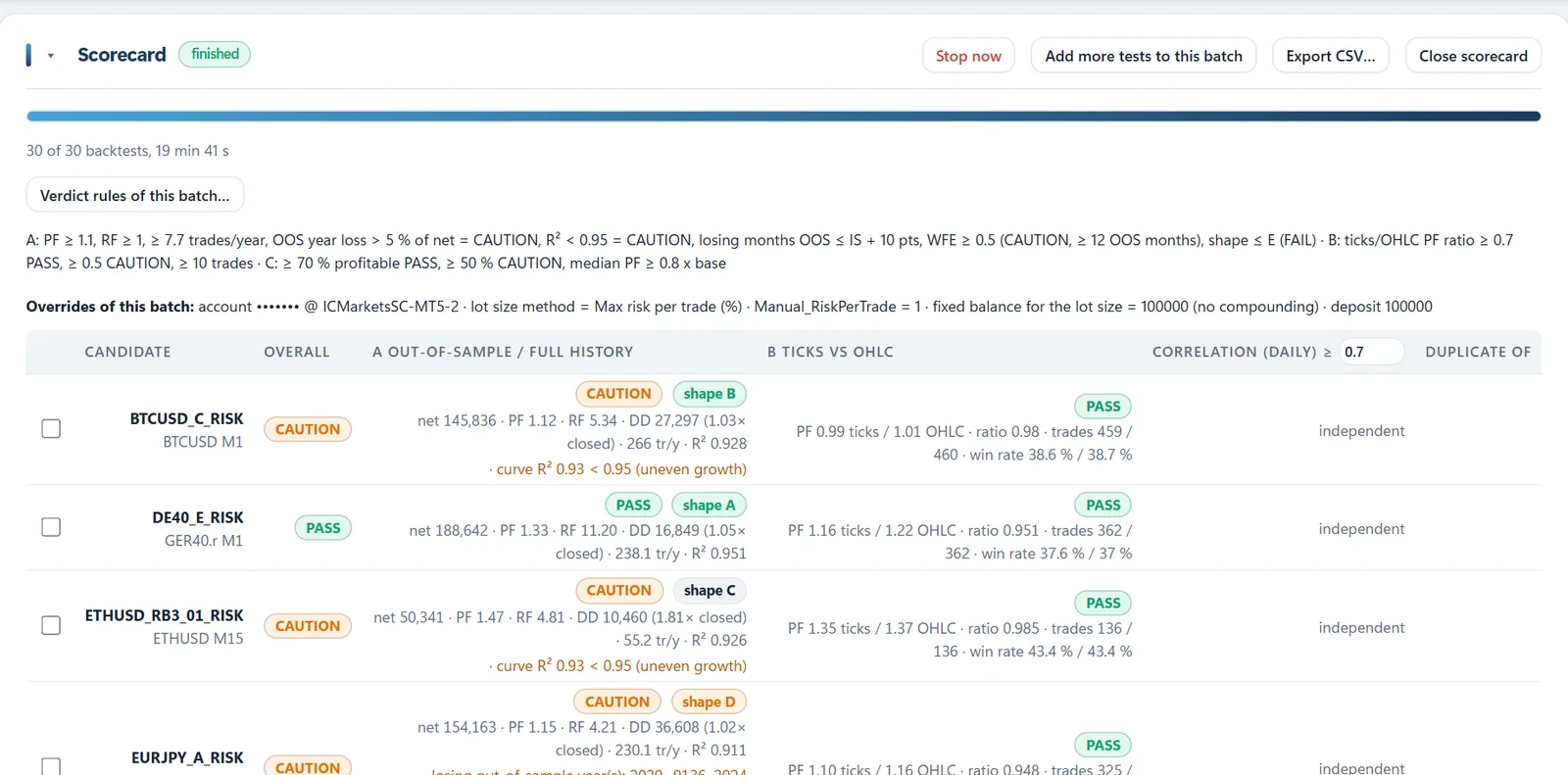
Five separate tests, run in batches over the whole history. The scorecard shows the verdict, the numbers behind it and the reason in plain words.
A clear verdict
Net result, profit factor, recovery factor, drawdown, trades per year and curve quality, judged against your rules.
The reason, in plain words
Every verdict comes with what held the strategy back, such as a losing out-of-sample year or uneven growth.
Real ticks against 1-minute bars
The same period twice. If a strategy only shines on rough bars, you see it here, before it costs you money.
Fast, at any broker
Little Helpers run backtests side by side on parallel MT5 terminals. Run a batch at any broker account you have and compare.
The Five Tests
Out-Of-Sample
The full history, including the years the optimizer never saw.
Real Ticks vs 1-Min Bars
The same period on both. Strategies that only work on rough data get caught.
Small Changes
Every parameter nudged a little. Good settings still work next to their neighbors.
Other Symbols
Checks whether the edge carries over to related markets.
Higher Costs
More spread and commission, to see whether a profit is still left.
See Exactly Why A Strategy Passes
- The full-history growth curve of every candidate, out-of-sample years included.
- A curve shape grade from A to F, scoring straightness, positive years, drawdown, flat stretches and how much one period carries.
- Every year on its own, so one strong year cannot hide a weak one.
- Your own verdict rules. Set the limits once, then judge any batch again without re-running it.
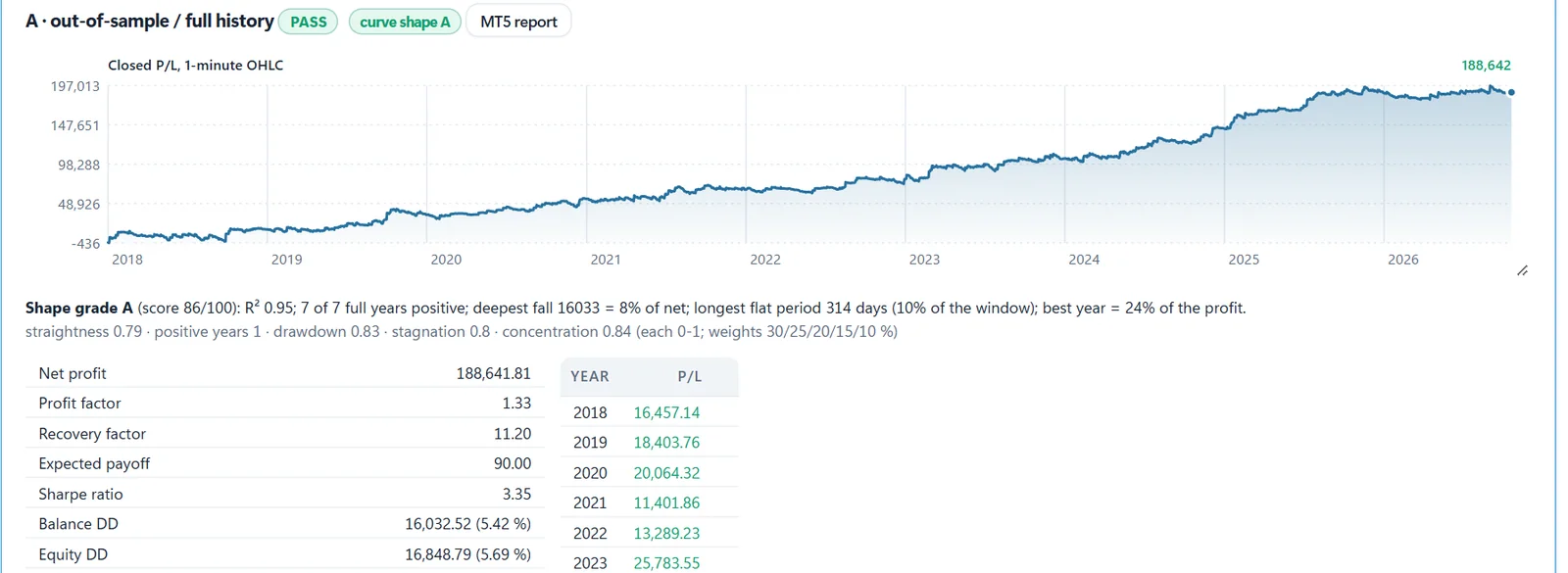
Example, Test A: Out-Of-Sample Over The Full History
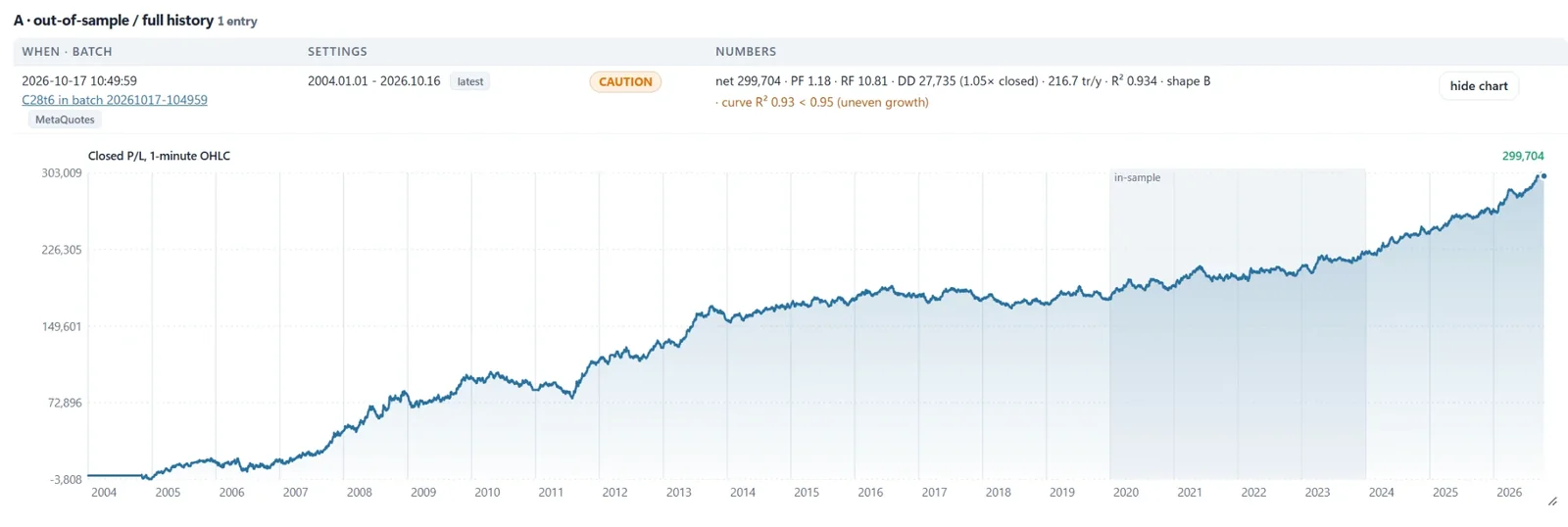
- Shaded: the only years the optimizer saw.
- The 16 years before it were never seen, and the curve still grows through them.
- The years after it too.
- Verdict CAUTION, with the reason: the curve straightness score (R²) is 0.93, below the 0.95 limit.
Example, Test B: Real Ticks Against 1-Minute Bars
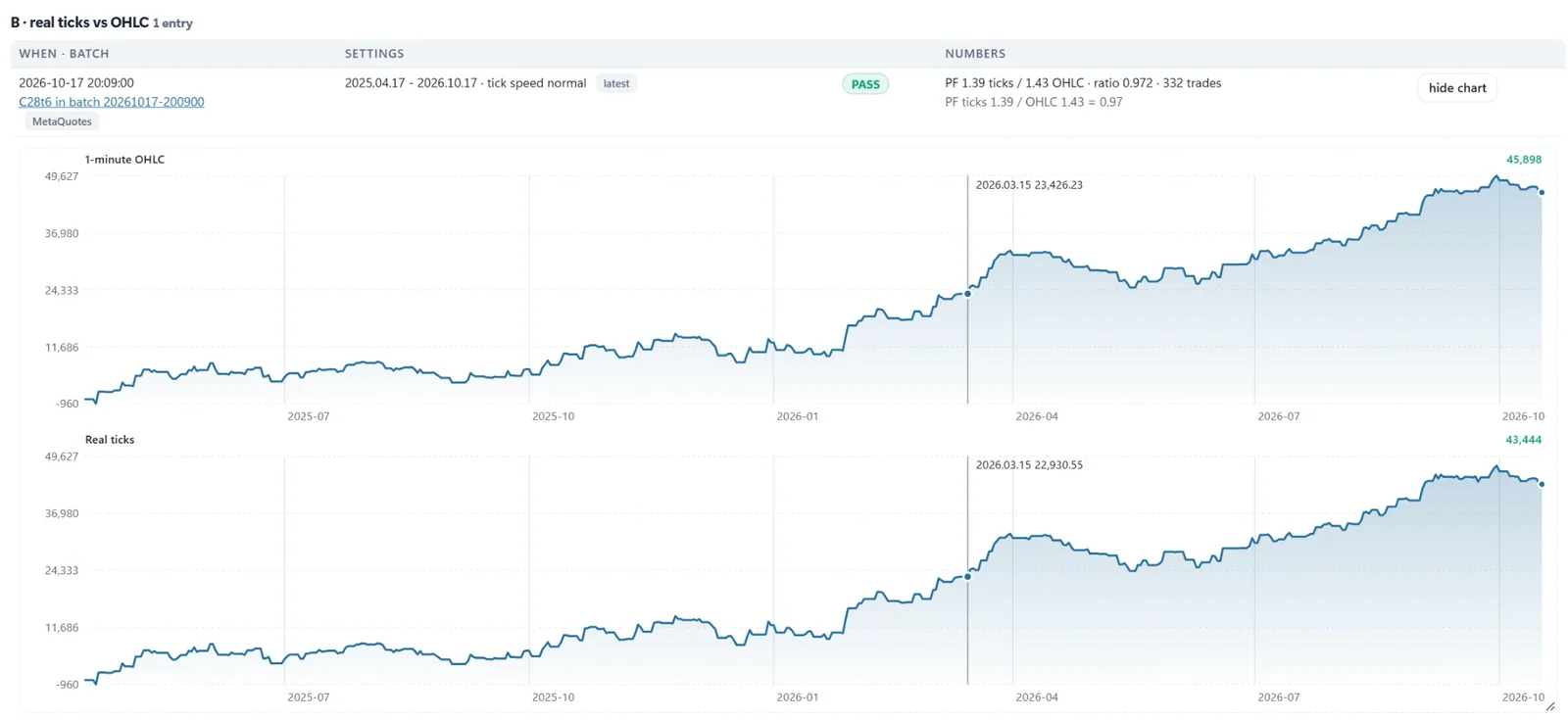
- Profit factor 1.39 on real ticks against 1.43 on 1-minute bars. Ratio 0.97, so PASS.
- The two curves sit almost on top of each other.
- The edge is not something the rough data made up.
Five tests before a single live trade. The Optimizer comes with the Ultimate Breakout System.
The Optimizer is included. 30 days to change your mind, full refund
Step 4 · Finetune
Finetuning That Refuses To Curve-Fit
Polish a good strategy on recent data without fooling yourself. Every tuned variant is checked on years it never saw. If it is only better on the tuned period, the app rejects it.
Small moves around a strategy that works
The app re-optimizes the key inputs in small steps over a recent window you choose.
Reject, caution or accept
A verdict per variant, with the number of checks it failed. Accept a variant and it becomes a new candidate.
Judged on the untouched years
Profit against drawdown has to hold up outside the tuned window too. Red means it got worse there.
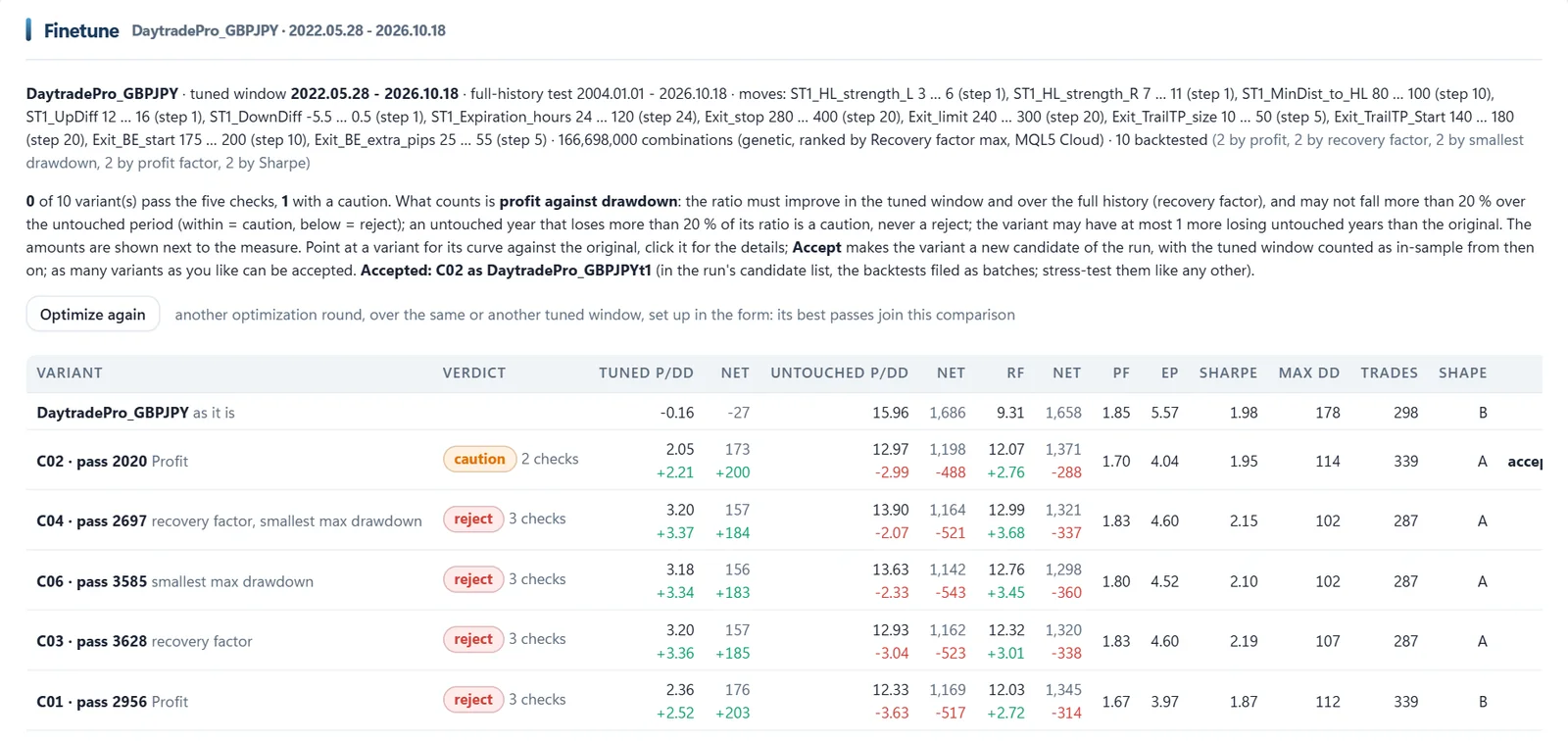
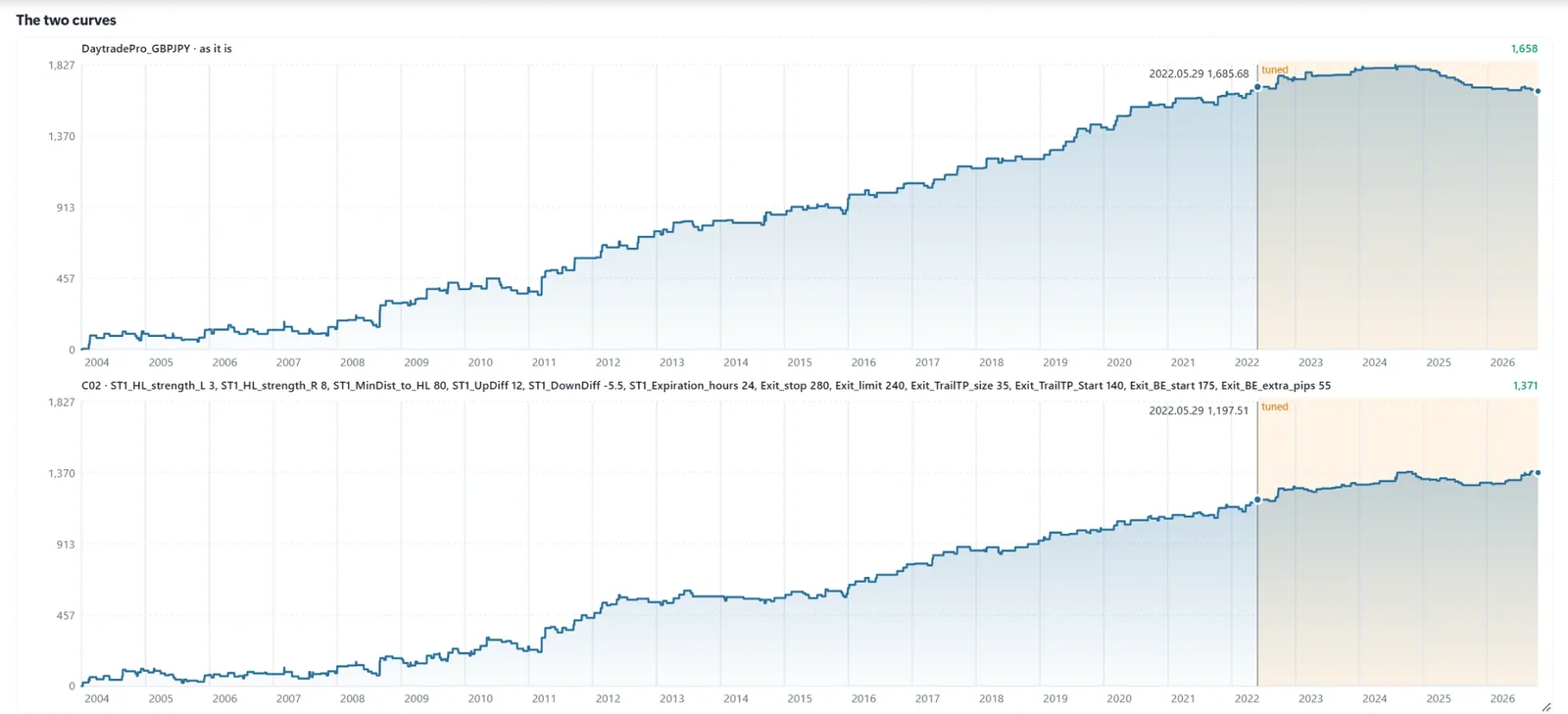
Example: Daytrade Pro On GBPJPY
As it is, against tuned variant C02.
- As it is, the strategy stalls and gives back profit in the recent window (shaded).
- Tuned variant C02 keeps growing in that same window.
- The 18 years before it stay just as steady, so the tuning did not break the history.
Step 5 · Portfolio
One Click Finds The Smoothest Mix
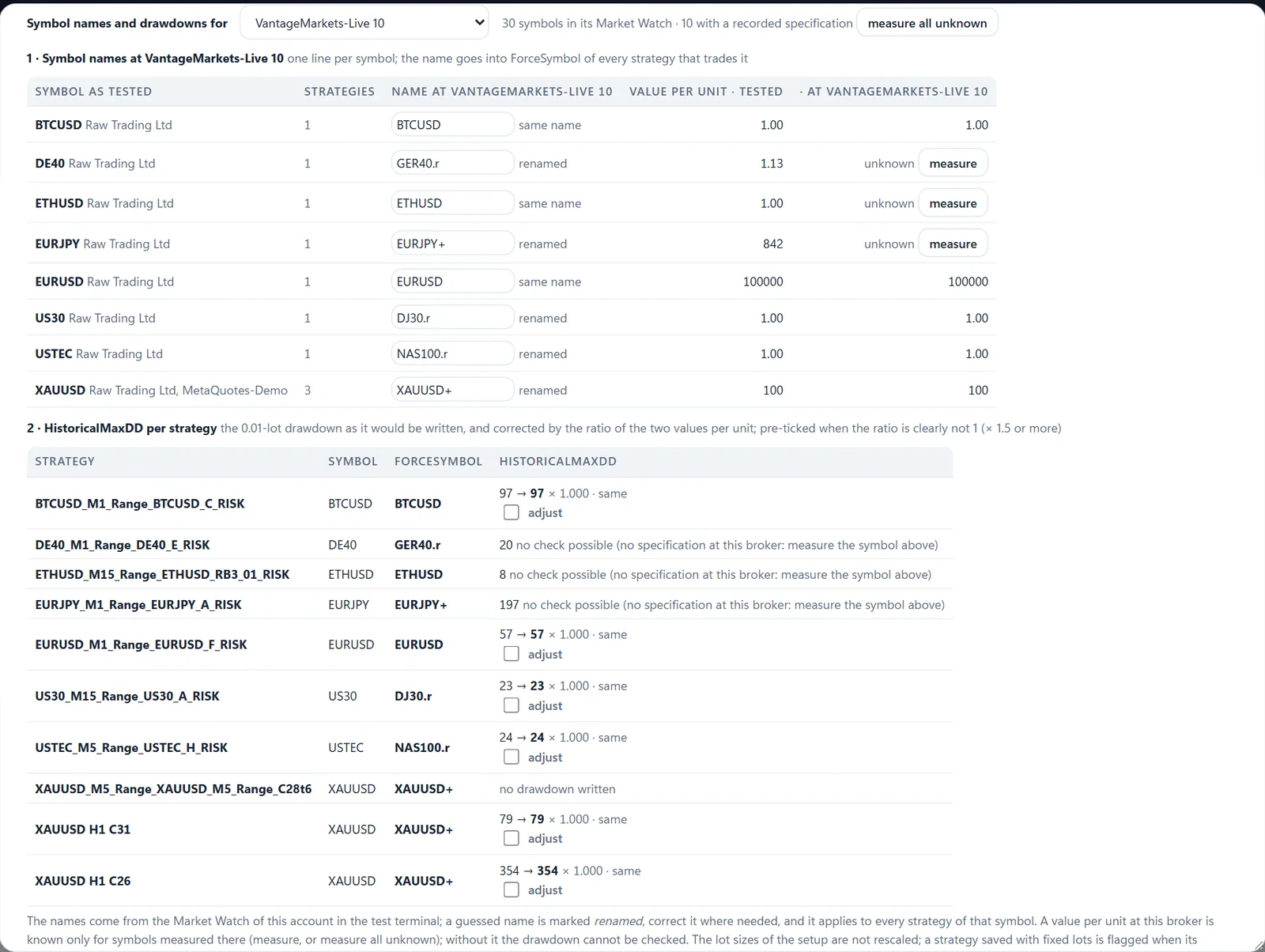
Send your best strategies to the portfolio builder. It picks the least correlated ones, sizes every lot to your drawdown target and saves the complete setup, ready for MT5.
Find the smoothest mix
Searches the lot size per strategy for the steadiest combined growth curve.
Set your drawdown target
Move the slider and every lot size scales to that maximum drawdown, the same way the EA sizes its orders.
Save the full setup
One set file per strategy with lot sizes and magic numbers filled in, plus a portfolio report.
Every statistic you need
Result, risk, ratios, diversification, month and year tables, with or without compounding.
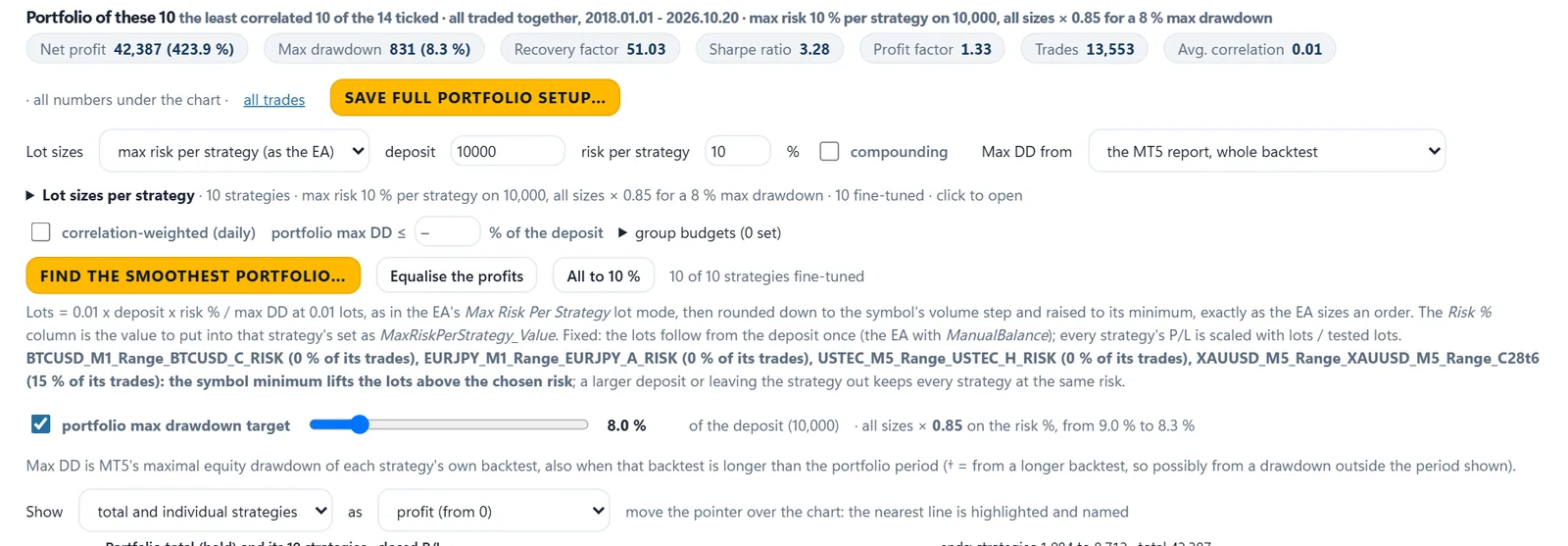
Export Your Setup For Any Broker
Brokers name markets differently (XAUUSD, XAUUSD+, GOLD, or US30 and DJ30.r) and sometimes trade them in another contract size. Pick the broker account when you save and the app does the rest.
- Symbol names matched to that broker's Market Watch, written into every set file.
- Drawdown values corrected when a contract size differs, so the EA sizes its lots right.
- Unknown symbol details measured at that broker in seconds.
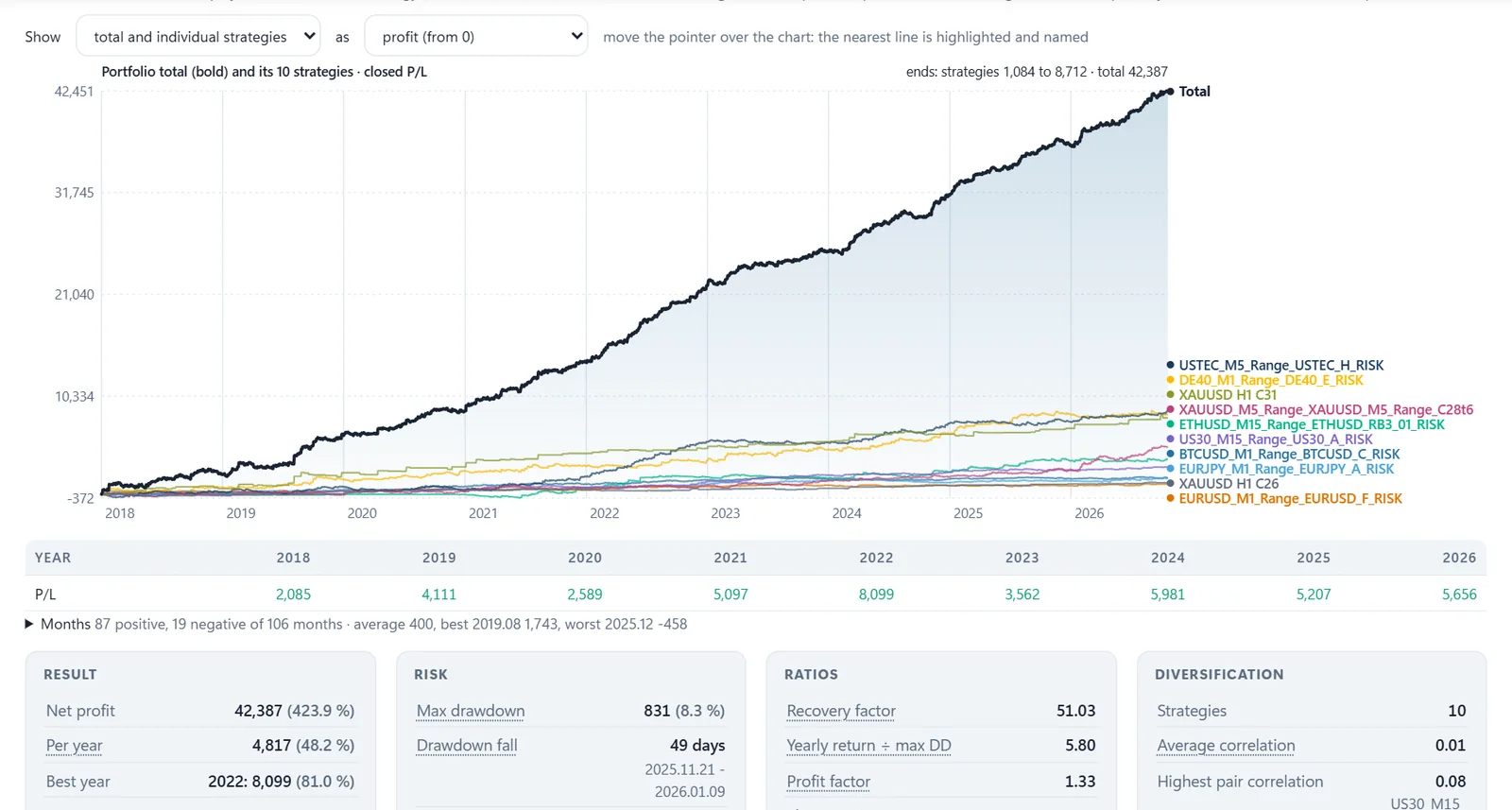
- All strategies traded together on one account.
- Indices, gold, forex and crypto that do not move together.
- An average correlation of 0.01 between them in this backtest.
Step 6 · Live Check
Check Your Live Account Trades Like The Backtest
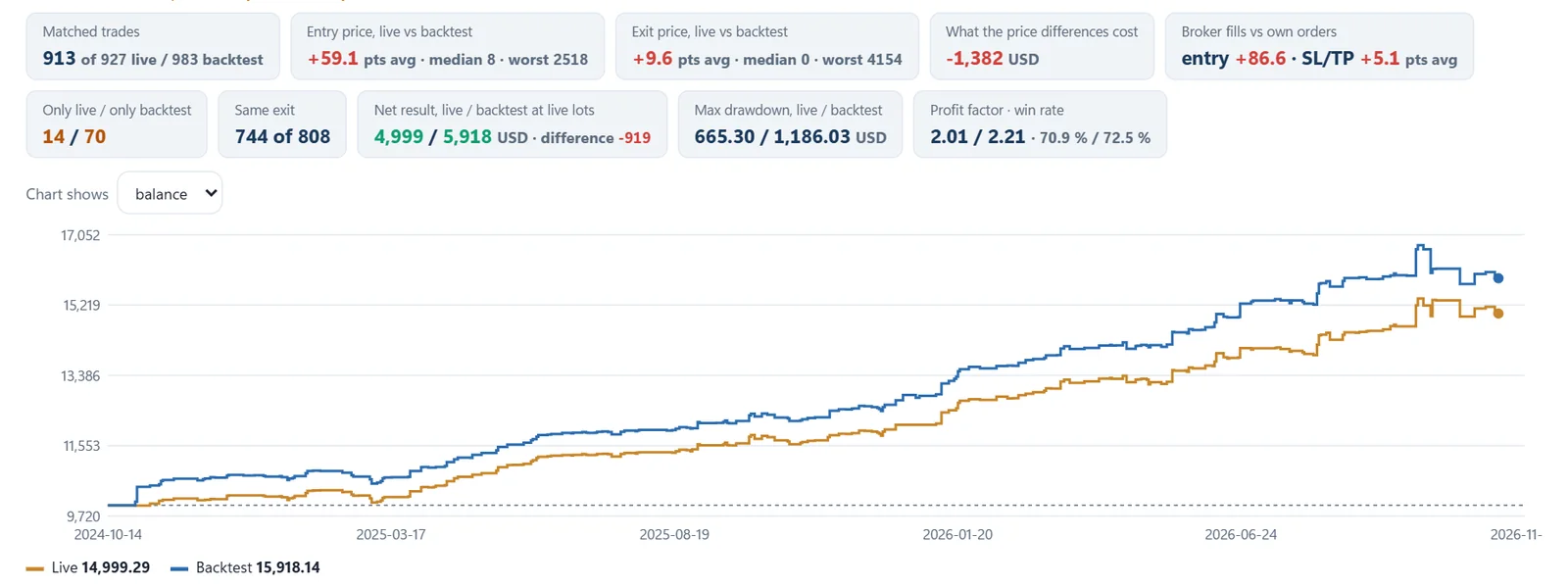
Connect your account with its read-only investor password. The app finds the set files behind your live trades, reruns the same period in MT5 and lays both results over each other.
Trade matching
Every live trade is paired with its backtest twin. In this example 913 of 927 live trades were found.
What the price differences cost
Entry and exit slippage in points, and their total cost in money.
Both curves on one chart
Orange is the real account, blue is the backtest of the same strategies at the live lot sizes.
Checked Down To The Single Trade
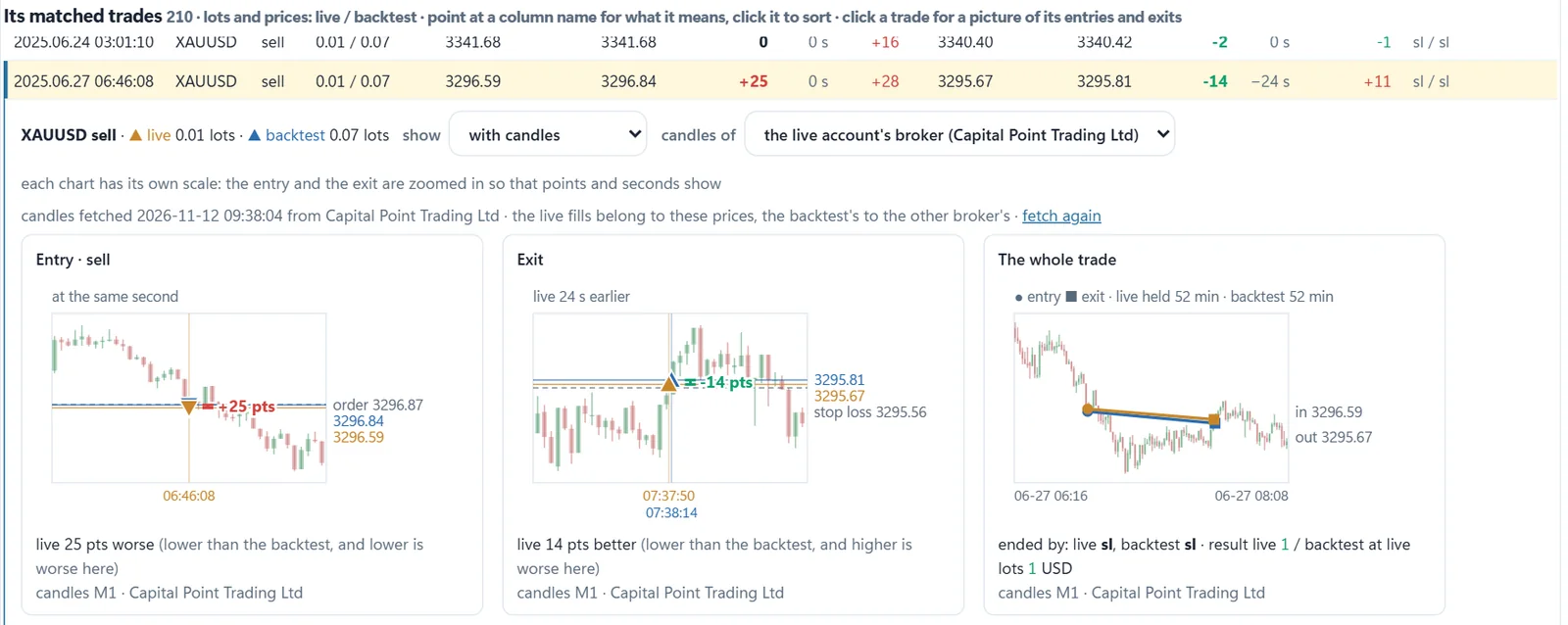
- The entry: order price, live fill and backtest fill on the candles of that moment.
- The exit: how many points and seconds the live exit differed.
- The whole trade, live and backtest side by side from entry to exit.
Slippage, late fills and broker differences become visible, per strategy and per trade.
See whether your live account trades like the test. Included with the Ultimate Breakout System.
The Optimizer is included. 30 days to change your mind, full refund
Included · Ready-Made Strategies
350+ Strategies Ready For Your Portfolio
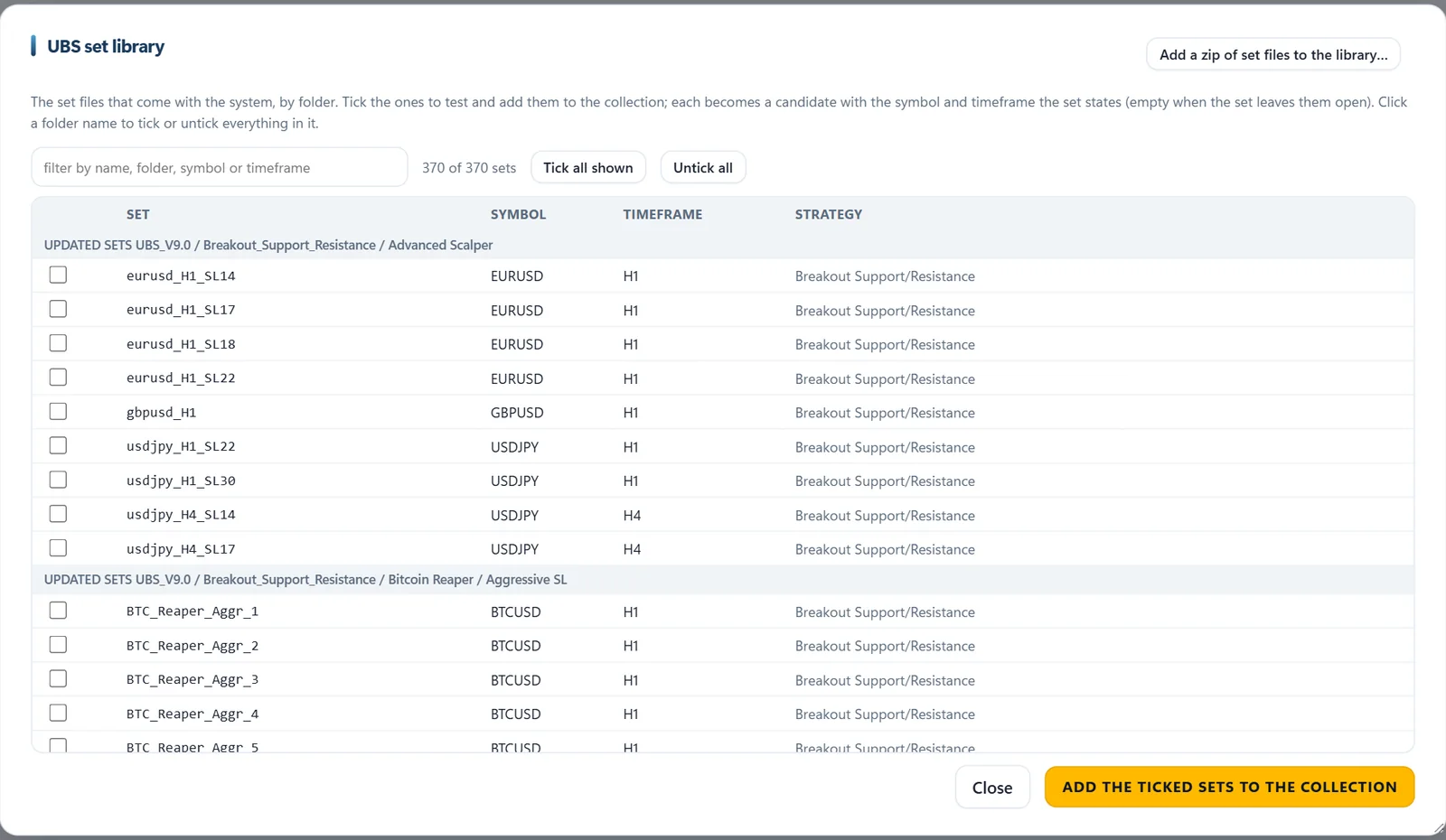
The app comes with the UBS set library: hundreds of finished set files on gold, forex, indices, stocks, oil, silver and crypto. Tick them, stress test them at your own broker, and build a portfolio the same day.
370 set files, and growing
Search by name, folder, symbol or timeframe, and tick a whole folder with one click.
Sorted by strategy family
Breakout Support/Resistance, Volatility Breakout, Range Breakout and complete live portfolios.
Straight into a collection
Add the ticked sets to a collection and run the full stress tests on them, at any broker.
And Much More
Built By A Trader, For Traders
Everything you need between a single idea and a portfolio you trust with real money.
Little Helpers
Parallel MT5 terminals run your stress tests side by side, so big batches finish in a fraction of the time.
Test At Any Broker
Run any batch at any broker account you have, and compare the results broker against broker.
All Tests In One View
Every test ever run on a strategy side by side, with your notes, and one click to the portfolio.
Compounding Preview
See the same portfolio with fixed lots and with compounding, at the same drawdown level.
AI Assistant Ready
Connect an AI assistant (MCP) to start runs, read scorecards and explain results in plain language.
Share And Import
Send a run or a portfolio to someone else as one file. Account numbers are always left out.
Your PC, Your Data
Everything runs on your own MetaTrader 5. Nothing is uploaded and nothing is shared.
Manuals Built In
A quick guide, an FAQ and a manual for every tab, right inside the app.
Set Library Search
Search the set files by name, folder, symbol or timeframe, and tick a whole folder at once.
UBS Optimizer Questions
Included With The System
Your Own Strategy Lab Comes With The Ultimate Breakout System
Create, test, balance and check your strategies, all in one place. One payment of $1,699 gets you the Ultimate Breakout System for MetaTrader 5, and the Optimizer comes with it.
Get The SystemGet The Ultimate Breakout System
Figures in the screenshots are backtest results of example strategies and portfolios. Backtests and past results are no guarantee of future results. Trading forex and CFDs carries a high level of risk and may not be suitable for all investors. Only trade with money you can afford to lose.